Notes on Axel Rauschmayer's JavaScript for Impatient Programmers
May 21, 2023

These are my notes from Javascript for impatient programmers. I highly recommend you read through the book for a better understanding of the concepts. However, if you are already familiar with JS this could be a great way resource to revise essential things.
III - Variables and values#
Variables and assignment#
let#
Variables declared using let are blocked scope and mutable.
{
    let i;
    i = 0;
    console.log(i) //0
}
console.log(i) //ReferenceError
const#
Variables declared using const are blocked scoped and immutable. They have to be declared and uninitialized at the same point.
{
    const i = 0;
    i = 1; //TypeError: Assignment of const variable.
    console.log(i) //0
}
console.log(i) //Reference error
When are saying that variables declared via const are immutable we mean the binding between the variable name and its value. The value itself could be mutable.

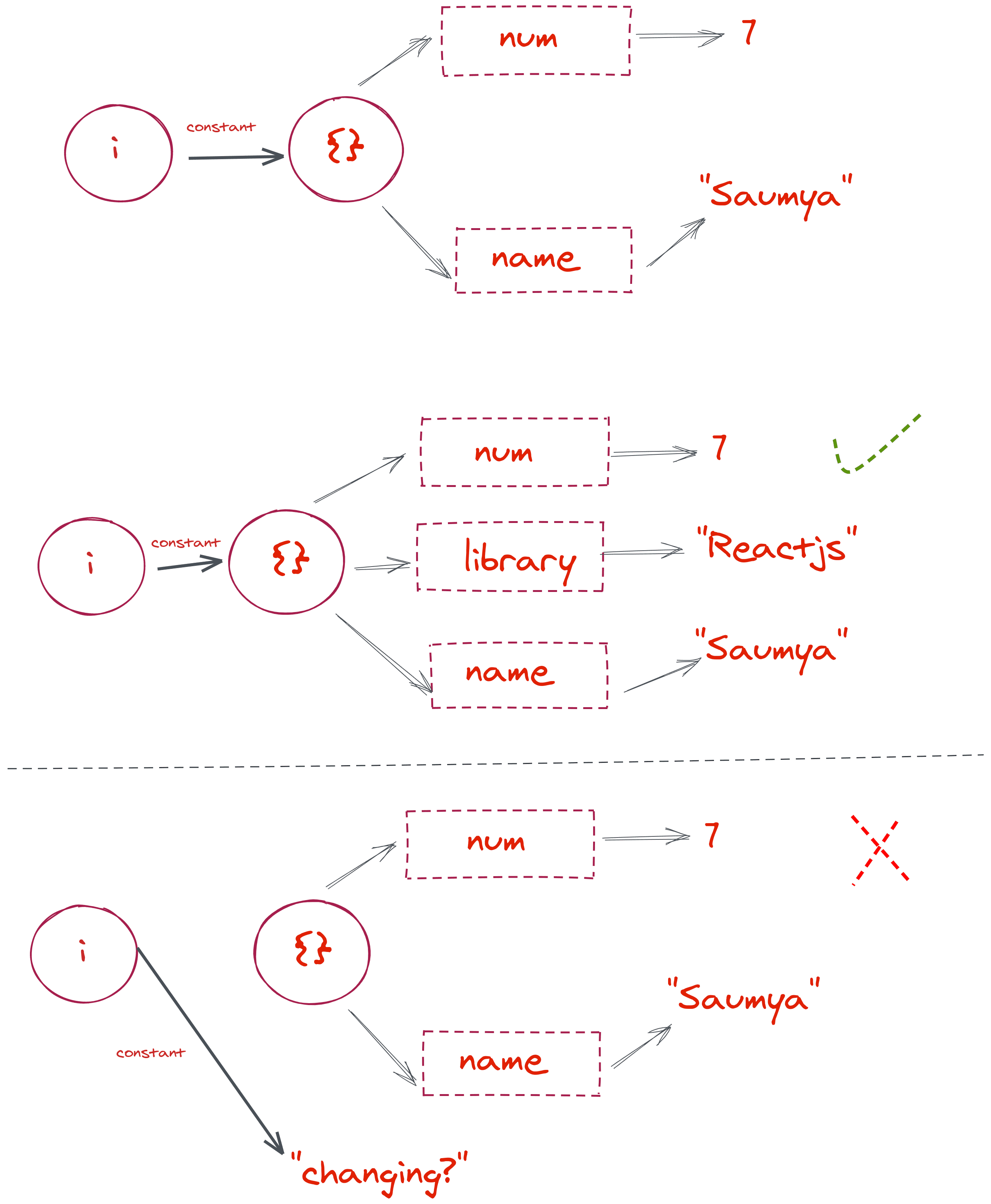
Here we depict that the connection between i and {} is constant and cannot be changed but we can add a new property to the {}.
Stactic vs Dyanmic#
- Static means something is related to the source code and can be determined without executing code.
- Dynamic means at runtime.
Global variable and global object#
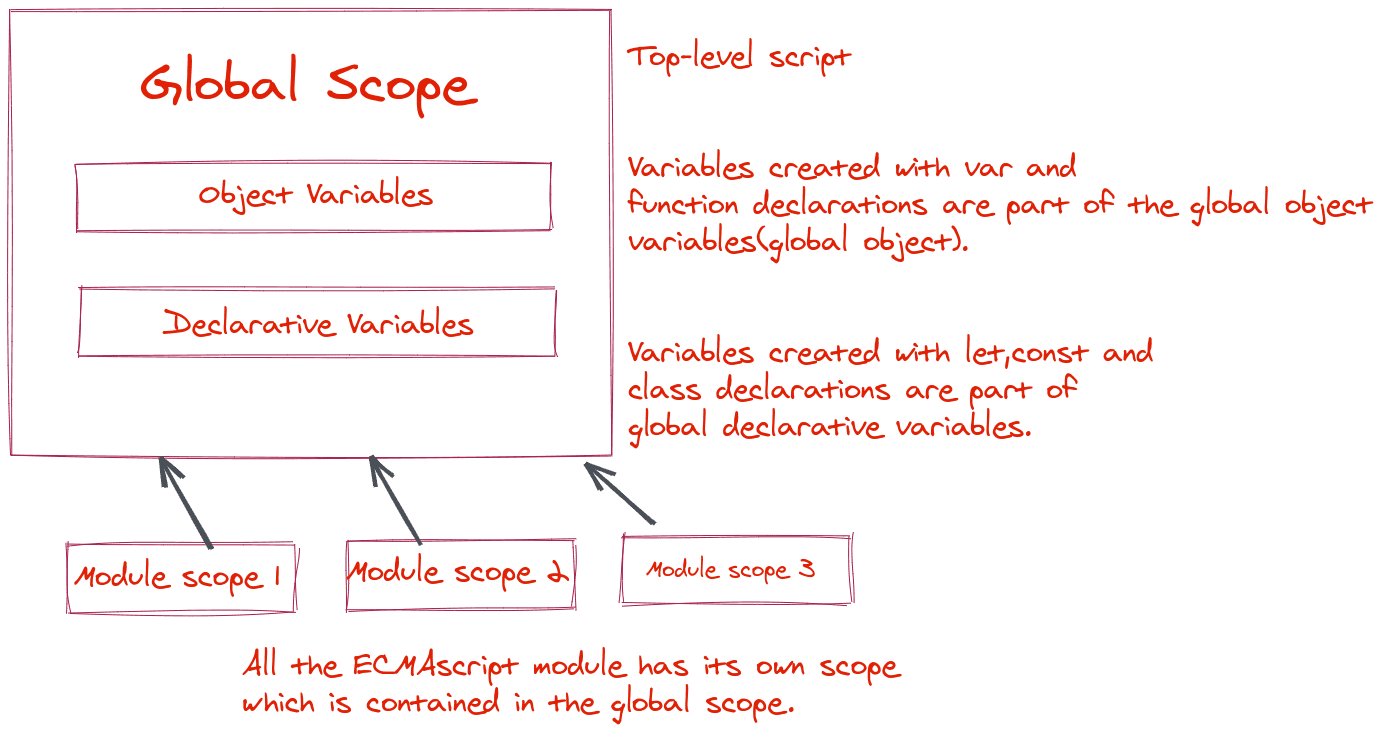
All the scope in javascript can be imagined in a tree form. The outermost scope or root node is the global scope of the environment.
The variables of the global scope are called global variables and are accessible everywhere.
There are two types of global variables.
- Global declarative variables.
Normal variables are declared using
let,constorclassdeclarations. - Global object variables.
Variables are declared using
varorfunctiondeclarations.
globalThis is used to access global object variables. The reason why it got its name is that it is equal to this in the global scope.

//Global scope
const declarativeVariables = 0;
var objectVariables = 23;

console.log(declarativeVariables) //0
console.log(objectVariables) //23

console.log(globalThis.declarativeVariables)//undefined
console.log(globalThis.objectVariables) //23
Declarations: scope and activation#
Declaration scope is the area where a variable or entity can be seen. Variables that are blocked scope have their declaration scope between the { and } they enclosed.
But, their activation is somewhere else. The activation is the line where we can access the variable or entity without getting any errors.
{
    console.log(sum) //ReferenceError
    const sum = 0;
}
Here we are trying to access a variable in its scope but the variable is not activated yet. const, let and class declarations behave in this particular way. The zone between the scope and activation of the entity is called Temporal Dead Zone (TDZ).
The reason why class declarations also have TDZ is following
class Name extends <expression>{

}
the expression part could evolve into anything and it is better to start its activation at the same place where it is written to not make things confusing.
Whereas, the variables declared with var are function scoped and do not have TDZ. In the case of variables declared with var will return undefined when accessed before their initializations.
The same goes with function, you could write the function declaration at the bottom and make a function call at the top of the file.
However, there is a caveat. function declared with let or const keywords have TDZ and cannot be accessed before their declarations.
onetwothree() //ReferenceError
const onetwothree = () => {return 123;}
Closures#
Closures are functions that have a connection with variables that exist at their "birth place".
function increment(value){
    return (num) => {
        return num+value;
    }
}
const incrementFive = increment(5);
console.log(incrementFive(1)); //6
Static scoping is supported via closures in JS. Technically every function is a closure.
Use cases of closures
- They are implementation of static scoping and help to provide context data to callbacks.
- To store state to persist across function calls.
Values#
What is a type?
Type is a set of values.
For example, type boolean consist of {true, false}. Only two values.
Similarly, string and number have infinitely many values.
The types in JS are:
- null
- undefined
- boolean
- string
- number
- bigint
- symbol
- object
Primitive values are variables of the types null, undefined, string, number, bigint, symbol and boolean and all other values are objects.
Primitive values are always passed and compared by values. Object values are always passed and compared by reference.
Two common ways of creating an object:
- Object literal
const obj = { first : 'saumya' } - Array literal
const arr = ['saumya']
typeof and instanceof#
- typeof is used to check the type of a value. Returns a string.
- instanceof determines which class created a given value. Returns
trueorfalse.
Rule of thumb: typeof is used for primitive types and instanceof is used for Objects.
| x | typeof x |
|---|---|
| undefined | 'undefined' |
| null | 'object' |
| string | 'string' |
| boolean | 'boolean' |
| bigint | 'bigint' |
| number | 'number' |
| function | 'function' |
| All other objects | 'object' |
({}) instanceof Object //true
([]) instanceof Array //true

123 instanceof Number //false
Use Object(value) to convert a value from a primitive to an object type.
| x | Object(x) |
|---|---|
| undefined | {} |
| null | {} |
| string | new String(x) |
| boolean | new Boolean(x) |
| bigint | An instance of BigInt |
| number | new Number(x) |
| symbol | An instance of Symbol |
| object | x |
Coercion#
When we perform an operation, the operator needs the operands in a specific type. If the operands are not in the desired types, they are tried to convert into the desired type. Most of the time people don't bother to understand the significance of operand type and raise questions about the unpredictability of JS.
For example
'1' x '4'
will result in 4. Because the x operator will convert its operand to numbers.
Operators#
Loose equality ( == )#
- It coerces its operands to a primitives type if the other operand is a primitive type.
- If both operands are objects, they are only equal if the objects are the same.
undefined == null //true
Strict Equality ( === )#
- It doesn't coerce its operands.
undefined === null //false
NaN === NaN //false
Strictest : Object.is(x,y)#
Object.is(123,123) //true
Object.is(NaN,NaN) //true
Nullish Coalescing operator ( ?? )#
If the first operand is either null or undefined and returns the second operand as a fallback.
a ?? b
a !== undefined && a!== null ? a : b
Comma Operator#
Evaluate both expressions and return the second one.
2+2,4+1 //5
Void operator#
Evaluates its operand and return undefined
void(3+1) //undefined